Add Files to a Net Express Project

|
Map Data File Names Add Files to a Net Express Project |
|


 Introduction
This document describes how to add data files to a Net Express project. This is a three step process.
| 1. | Start Net Express, select Project Properties. |
| 2. | Select the IDE, Map to External Name. |
| 3. | Define Environment Variables for Data Files |
Note: This module is part of The SimoPATH Series of training and reference materials. For more information refer to The Home Page for The SimoPATH Series.
Adding Data Files to a Project
The following describes how to add data files to a Net Express project.
Step 1, Select Project Properties
The first task is to configure the project to use a directive to map program file names to external file names.
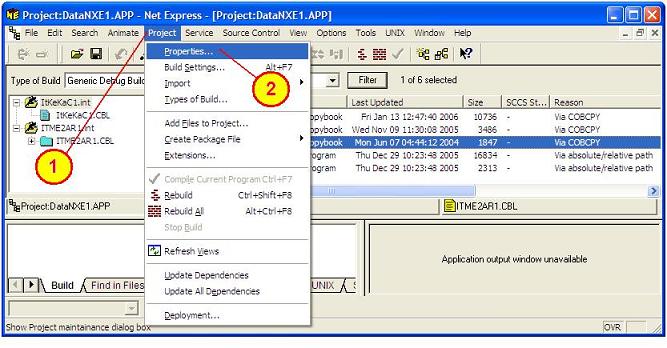
| 1. | This step contains the following two tasks. |
| 1.1. | From the Net Express tool bar select the "Project" option. |
| 1.2. | From the drop-down list select the "Properties..." option. |
Step 2, Select the IDE, Map External Name
The following window should be displayed.
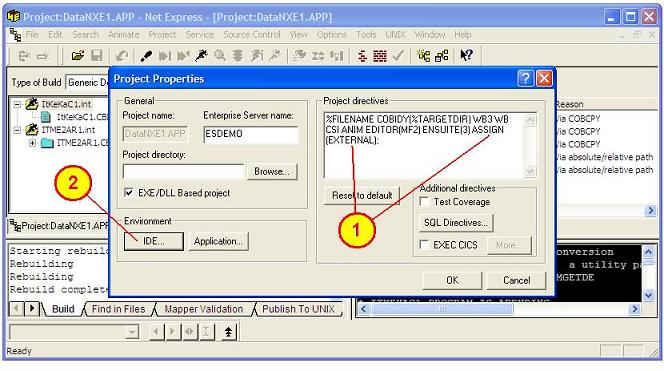
| 2. | This step contains the following two tasks. |
| 2.1. | In the Project directives pane add the ASSIGN(EXTERNAL) directive before the semi-colon. |
| 2.2. | From the "Project Properties" window click on the "IDE" button. |
Step 3, Define Environment Variables
The following Window should be displayed.
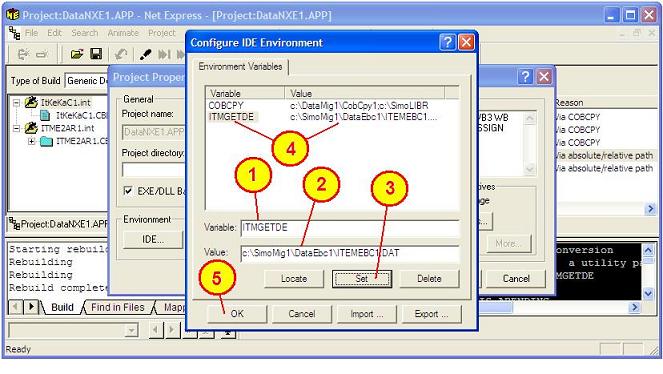
| 3. | This step contains the following five tasks. |
| 3.1. |
In the "Variable;" box type in the variable name "ITMGETDE" is used for the input file and "ITMPUTDA" is used for the output file. Note: This is the name of the file that is used by the COBOL program |
| 3.2. |
In the "Value:" box type in the drive\irectory\name.ext of the name of the file as it resides on disk. For this example use the following. "c:\DataMig1\DataEbc1\ITEMEBC1.DAT" is the EBCDIC-encoded input file. "c:\DataMig1\DataAsc1\ITEMASC1.DAT" is the ASCII-encoded output file. |
| 3.3. | Click on the "Set" button. This is very important to do. If the "OK" button is clicked without first clicking the "Set" button the information in the "Variable" box and the "Value" box will not be applied. The information must be displayed in the list of environment variables as shown in step 3.4. |
| 3.4. |
Make sure the variable name and value appear in the larger window pane. Note: Repeat steps 3.1 through 3.4 for both the input and output file. |
| 3.5. | Click on the "OK" button to return to the previous screen. |
This is the end of the process for adding a data file to a Net Express project.
Summary
The purpose of this document is to define how to add data files to a Net Express project. This document may be used to assist as a tutorial for new programmers or as a quick reference for experienced programmers.
In the world of programming there are many ways to solve a problem. This document and the links to other documents are intended to provide a greater awareness of the Data Management and Application Processing alternatives.
The documentation and software were developed and tested on systems that are configured for a SIMOTIME environment based on the hardware, operating systems, user requirements and security requirements. Therefore, adjustments may be needed to execute the jobs and programs when transferred to a system of a different architecture or configuration.
SIMOTIME Services has experience in moving or sharing data or application processing across a variety of systems. For additional information about SIMOTIME Services or Technologies please contact us using the information in the Comments or Feedback section of this document.
Software Agreement and Disclaimer
Permission to use, copy, modify and distribute this software, documentation or training material for any purpose requires a fee to be paid to SimoTime Technologies. Once the fee is received by SimoTime the latest version of the software, documentation or training material will be delivered and a license will be granted for use within an enterprise, provided the SimoTime copyright notice appear on all copies of the software. The SimoTime name or Logo may not be used in any advertising or publicity pertaining to the use of the software without the written permission of SimoTime Technologies.
SimoTime Technologies makes no warranty or representations about the suitability of the software, documentation or learning material for any purpose. It is provided "AS IS" without any expressed or implied warranty, including the implied warranties of merchantability, fitness for a particular purpose and non-infringement. SimoTime Technologies shall not be liable for any direct, indirect, special or consequential damages resulting from the loss of use, data or projects, whether in an action of contract or tort, arising out of or in connection with the use or performance of this software, documentation or training material.
Downloads and Links
This section includes links to documents with additional information that are beyond the scope and purpose of this document. The first group of documents may be available from a local system or via an internet connection, the second group of documents will require an internet connection.
Note: A SimoTime License is required for the items to be made available on a local system or server.
Current Server or Internet Access
The following links may be to the current server or to the Internet.
Note: The latest versions of the SimoTime Documents and Program Suites are available on the Internet and may be accessed using the  icon. If a user has a SimoTime Enterprise License the Documents and Program Suites may be available on a local server and accessed using the
  icon.
icon.
Explore The SIMOPATH Series starting at the home page to view information about training sessions and learning materials available from SimoTime Enterprises.
Explore An Enterprise System Model that describes and demonstrates how Applications that were running on a Mainframe System and non-relational data that was located on the Mainframe System were copied and deployed in a Microsoft Windows environment with Micro Focus Enterprise Server.
Explore the COBOL Connection for more examples of COBOL programming techniques and sample code.
Explore The ASCII and EBCDIC Translation Tables. These tables are provided for individuals that need to better understand the bit structures and differences of the encoding formats.
Explore The File Status Return Codes to interpret the results of accessing VSAM data sets and/or QSAM files.
Internet Access Required
The following links will require an internet connection.
A good place to start is The SimoTime Home Page for access to white papers, program examples and product information. This link requires an Internet Connection
Explore The Micro Focus Web Site for more information about products and services available from Micro Focus. This link requires an Internet Connection.
Glossary of Terms
Explore the Glossary of Terms for a list of terms and definitions used in this suite of documents and white papers.
Comments or Feedback
This document was created and is maintained by SimoTime Technologies. If you have any questions, suggestions, comments or feedback please use the following contact information.
| 1. | Send an e-mail to our helpdesk. |
| 1.1. | helpdesk@simotime.com. |
| 2. | Our telephone numbers are as follows. |
| 2.1. | 1 415 763-9430 office-helpdesk |
| 2.2. | 1 415 827-7045 mobile |
We appreciate hearing from you.
Company Overview
SimoTime Technologies was founded in 1987 and is a privately owned company. We specialize in the creation and deployment of business applications using new or existing technologies and services. We have a team of individuals that understand the broad range of technologies being used in today's environments. Our customers include small businesses using Internet technologies to corporations using very large mainframe systems.
Quite often, to reach larger markets or provide a higher level of service to existing customers it requires the newer Internet technologies to work in a complementary manner with existing corporate mainframe systems. We specialize in preparing applications and the associated data that are currently residing on a single platform to be distributed across a variety of platforms.
Preparing the application programs will require the transfer of source members that will be compiled and deployed on the target platform. The data will need to be transferred between the systems and may need to be converted and validated at various stages within the process. SimoTime has the technology, services and experience to assist in the application and data management tasks involved with doing business in a multi-system environment.
Whether you want to use the Internet to expand into new market segments or as a delivery vehicle for existing business functions simply give us a call or check the web site at http://www.simotime.com
| Return-to-Top |
| Net Express, Add Data Files to a Project |
| Copyright © 1987-2019 SimoTime Technologies and Services All Rights Reserved |
| When technology complements business |
| http://www.simotime.com |